Part 0 of the Beyond Port 1433 series. Start here.
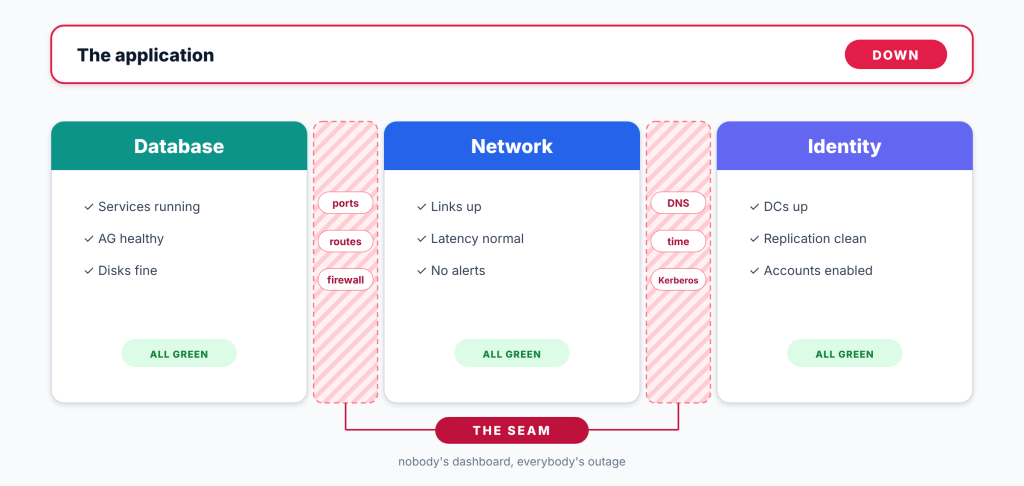
Every IT person has lived this outage: the app is down, the database team says the database is fine, the network team says the network is fine, and infrastructure team says the DCs are fine. Everyone is right, and the app is still down. The problem is in the seam between us. My goal is to bridge that gap. Not only for myself, but to show others out there that from the DBA’s chair, the network, infrastructure, and the database don’t have to be such completely separate knowledge domains where one is a black box to the other.
The Problem Lives In The Seam
Teams specialize in their own knowledge domains. And that is a good thing because it gives us subject matter experts. But that also means the first reaction to an outage is often “go ask team X”. It’s important as DBAs or any tech professional to have at least high level knowledge of how the other domains impact our own. That way, we can have the right conversations, and know the right questions to ask when working with team members in other departments.
The Cloud Moved The Network Into My Portal
With on-prem, someone else owned the wire, firewall and DNS. If something was wrong, or suspected to be wrong, I threw it over to another team or created a ticket. With the cloud, I’m finding that those separations of ownership become more blurred. In Azure, the NSGs, route table, DNS server settings and private IPs sit just a few clicks from the VM blade. Even as a DBA, there’s enough nuance and overlapping ownership where I could easily be the one clicking those buttons. And I have before. With how the DBA space is evolving, it makes it more of a necessity to broaden our knowledge scope.
Shared Ownership
First thing is first. I’m not trying to become a network engineer or an infrastructure wizard. Those folks will always be ninjas in that area and I have no desire to overstep. My goal is simple: be able to speak the language, read the diagrams, ask the right questions, and own my part of the seam better. Being able to speak with and work with the other teams that know the depth help move along initiatives faster when you have the insight of how it impacts your domain.
The Vehicle: Stretching My Lab AG To Azure
I advocate all the time for home labs for testing. You learn much more and at a faster rate by building things yourself, breaking them, fixing them, tearing them down, and building them back up. What better way to do that in a controlled environment that has no bearing or impact on anything at all? As my lab environment stands today, I have a two-node AG (SQLLAB-SQL1, SQLLAB-SQL2) and a Domain Controller running on Hyper-V on my laptop. The project I’m after is to add a third replica to that AG in Azure. That replica is going to be async, manual failover, and no quorum vote.
I chose to do this with an AG largely in part because this is a similar topology that I expect to run into more and more. I wanted to head into this as prepared as I could, so I figured I’d spend the time learning all of the inner workings through and through. But more than that, it is going to give me the opportunity to learn and better understand the switching, routing, a VPN, firewalls, DNS, AD sites, time, cluster, networking and more.

What I Built
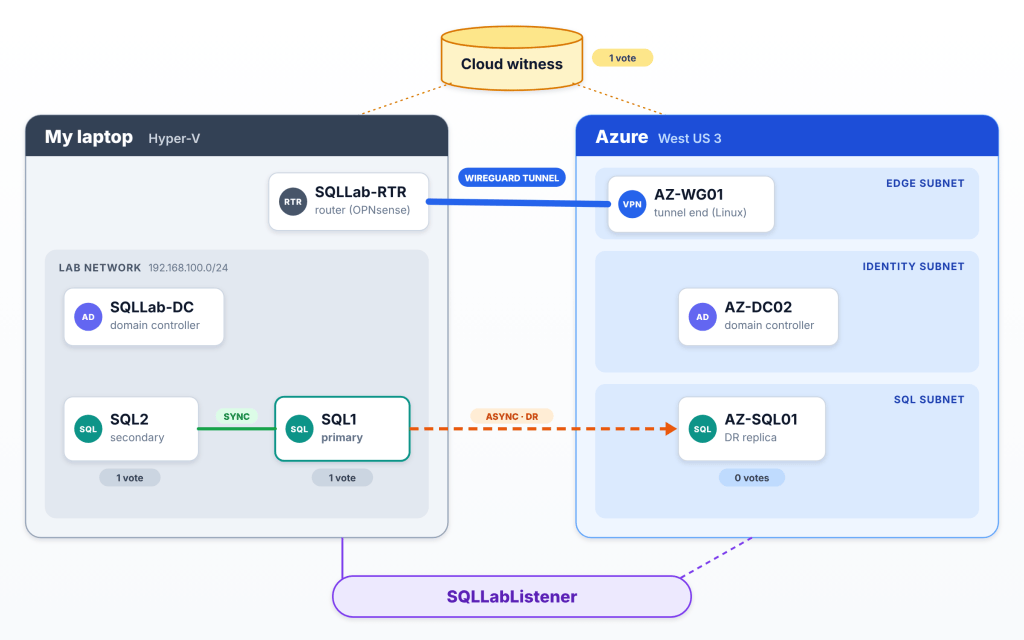
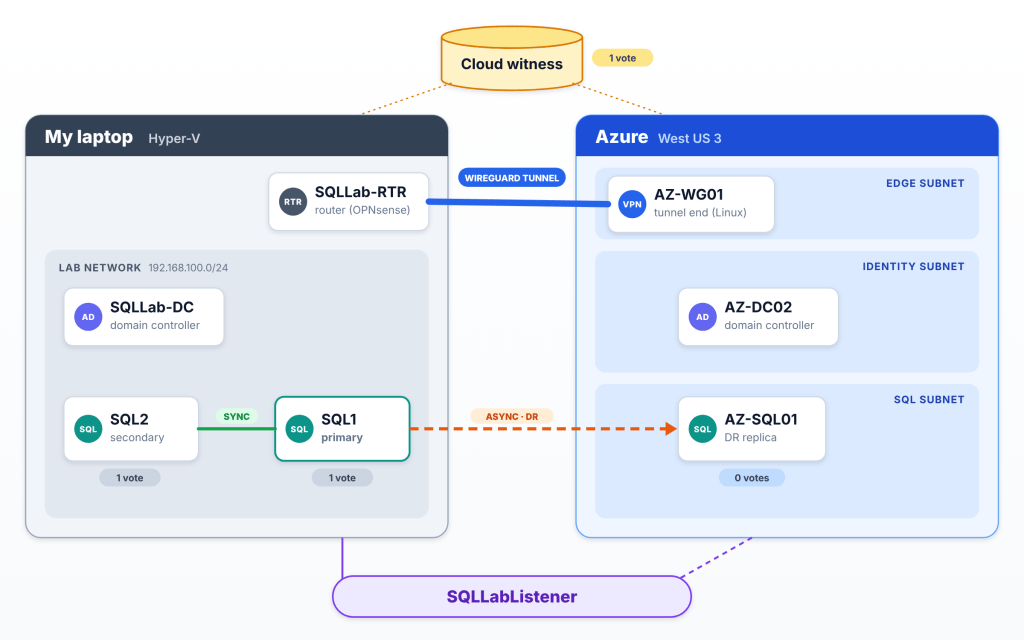
The finished lab. Every part of this series highlights one piece of this picture.
If you want to follow along, the PowerShell scripts I use to build my Hyper-V lab are on GitHub. You can get the code from my GitHub repo.
Walking through this diagram, on the lefthand side we have my laptop’s Hyper-V environment. In it there exists SQLLab-DC which is my on-prem domain controller, and my two-node AG SQLLAB-SQL1 and SQLLAB-SQL2 which all sit in its own network. Also in this Hyper-V environment we have SQLLab-RTR which is the object that is going to be used to dial out and send traffic to Azure. This VM will be running OPNsense.
On the righthand side, we have the Azure environment. In it exists three subnets. Edge subnet has a VM running Linux (cause it’s cheap and gets the job done) called AZ-WG01 to act as a Network Appliance to secure and route traffic to the rest of the environment. Identity subnet contains AZ-DC02 which is our domain controller in Azure. Lastly, SQL subnet contains AZ-SQL01 which is our DR replica.
Sending traffic between the two will be a WireGuard tunnel. SQLLabListener will be our listener that users and applications can connect to our AG through, and a cloud witness will be our tiebreaker vote so the cluster can maintain quorum.
PS C:\Users\Administrator.SQLLAB> tracert 10.20.1.10Tracing route to 10.20.1.10 over a maximum of 30 hops 1 <1 ms <1 ms <1 ms 192.168.100.1 2 6 ms 9 ms 5 ms 172.31.255.1 3 11 ms 9 ms 9 ms 10.20.1.10Trace complete.
There is a total of three hops going on to get from on-prem to Azure. It goes from the router, through the tunnel VM in Azure, and then the Azure DC. By Part 4, you’ll know why each of those hops is there.
Every Decision Was A Networking Decision
Before anything was built, every choice I had to make came down to a networking question. I needed to spend time architecting how the pieces would connect, and also keep track of what each section was teaching me, so I could document and work through this properly. This entire process also taught me how to break up an extremely complex and foreign topic into small, tangible pieces to manage this better.
| Decision | Why | What it teaches | Part |
|---|---|---|---|
| Extend my existing AG instead of building new | Keeps local HA in the lab; Azure becomes DR | Multi-subnet design | 7 |
| Azure replica is async with manual failover | Commits don’t wait on home internet | Latency and bandwidth | 8, 9 |
| Azure replica gets no quorum vote | Azure can never win an election alone | Quorum across a WAN | 7 |
| WireGuard on a small VM, not an Azure VPN gateway | Dials out from any Wi-Fi and costs far less | Site-to-site VPNs and NAT traversal | 4 |
| A real router (OPNsense) takes over the lab gateway | Windows NAT can’t route a tunnel | Routing vs NAT | 3 |
| Router uses Hyper-V’s Default Switch, not Wi-Fi | My home network never changes | Virtual switching and isolation | 1, 3 |
| A dedicated pay-as-you-go subscription | Isolated costs, one-click cleanup | Blast radius | 1 |
| An Azure VM size with no temp disk | D: stays free so paths match the lab | Not everything is networking: storage layout | 6 |
| Portal first then Bicep later | Learn each piece before automating it | Infrastructure as code | 2, 10 |
What Each Part In This Series Will Teach
Here is an index you can use to see and click to quickly navigate to each relevant blog post. With each new post I’ll be updating this table with clickable hyperlinks so that it’ll take you to the appropriate post.
| Part | Post | Networking concept |
|---|---|---|
| 1 | Don’t break the house | Isolation and address ranges |
| 2 | An Azure landing zone a DBA can read | VNets, subnets, NSGs, route tables |
| 3 | Giving my lab a real router | Gateways, routing vs NAT, reading tracert |
| 4 | A VPN from my laptop to Azure | Site-to-site VPN, keepalives, MSS |
| 5 | A domain controller in Azure | DNS, AD sites, time |
| 6 | Building the Azure replica | Layered firewalls, management ports |
| 7 | One cluster, two subnets | Multi-subnet clustering, quorum |
| 8 | An async replica and a two-address listener | Listener DNS, TTL, MultiSubnetFailover |
| 9 | Breaking it on purpose | Failover in practice, what clients see |
| 10 | Make it repeatable | Infrastructure as code, real costs |
| 11 | What changes at work | Who owns which layer |
What It Costs To Do This
I’m doing this with a Pay-as-you-go subscription. Azure VMs will bill by the hour only while running. I deallocate them after every working session (I’ll also provide scripts as well to turn your lab on and off so it’s not running 24/7). While everything is idle, there’s only a small monthly charge for the disks, the tunnel VM’s static public IP, and the witness storage. For example, this is only going to cost me about $6 this month. We’ll get to real numbers in Part 10.
Who This Is For
I’m doing this series for the DBAs who want to go beyond port 1433. This is also for anyone moving their SQL workloads from on-prem to Azure. Sure you can find documentation out there, maybe do a tailored MS learn session, but my intention is to make this more approachable and provide as many answers to as much nuance as I can that the documentation may be missing. Everything is so overwhelming when first stepping out of your domain. I know I was overwhelmed. I am still learning, but intending on trimming the fat for the next person so they can have a more direct path to start at. You don’t need to know everything a network engineer or an infrastructure person knows. I’m going to show you exactly what you need to know to narrow down your learning journey. Key note: this is a home lab and not a production design. some choices here only makes sense in the lab, and others carry straight over to production. In part 11 I’ll walk through which is which and what I’d do differently in a real environment.
TL;DR
- The hardest problems live between teams at the seams, not internally.
- The cloud puts networking within a DBA’s reach and often in a DBA’s hands.
- I’m learning it by stretching my lab AG to Azure over a WireGuard tunnel.
- There’s going to be roughly eleven parts that will include images, commands, and the gotchas I experienced along the way.
Next up will be Part 1, Don’t break the house. During this series, if you’re a network engineer, infrastructure person, or another DBA who has a different viewpoint of how to do the same things that I show, please let me know. I invite that feedback with open arms. That’s the whole point of me sharing this journey, to help others learn.


Leave a Reply