
As a DBA or any data professional, it is becoming more valuable and vital to have a well rounded understanding of your data estate and environment. However, sometimes it can be a bit cumbersome, especially when connecting to Azure resources via PowerShell. You have to fumble with authentication, connection cmdlets and more, which can be a bit discouraging to use at times.
There are some interesting and useful tools to help circumvent that overhead and manage your Azure resources. Azure Cloud Shell is a great quick tool to use if you want to have a lightweight, and easily accessible way to help manage and administer your Azure resources.
What Is Azure Cloud Shell And Why Is It Useful?
Azure Cloud Shell is a web-based CLI that you can access from any computer. You can even use it on your Smart Phone! The cool thing about this is all of the authentication is handled upfront. I don’t know about you, but having to use PowerShell and inputting all of your connection info at the command line is sometimes a tedious task to do. So, the fact that it is baked into the sign in process is a bonus.
I like to think of Azure Cloud Shell as an ephemeral tool. It’s meant to be used for an intentional purpose to address and manage resources for a specific task. You have the ability to connect via the link above or through the Azure Portal. If you have canned scripts, you can also upload them to the Azure CloudDrive and they’ll persist across sessions. You’re also able to connect an Azure Storage File Share that’s associated with a specific region.
What It Looks Like To Connect
If you go to a web browser and navigate to https://shell.azure.com/ you’ll be met with this opening option:
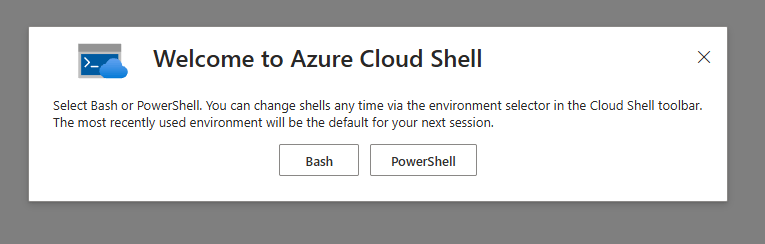
From there you can proceed with either Bash or PowerShell. You can switch at any time. I normally use PowerShell, so I’ll select that.
Next, you will be given the option to mount a storage account if you want (so you can access canned files and scripts), or choose to not link one at the moment. You’ll then have to select the subscription you want to connect to so you can manage those resources that are associated:
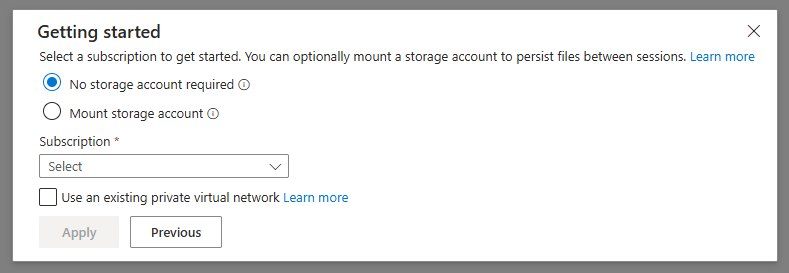
And just like that, you’re in!

Now you can manage resources with PowerShell or Bash, and this is a Microsoft managed tool, so you’ll always have the latest and greatest of all their Azure Cmdlets. As anyone familiar with the Azure cmdlets knows, remembering what’s available is daunting. However with the Azure Cloud Shell there’s a pretty nifty feature where you can start to type a cmdlet, hit TAB and it’ll give you an option to see all that is available:
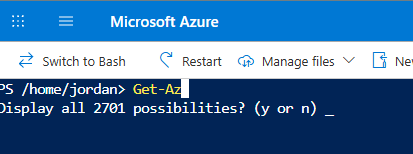
Just as an example, you can run the following to see a list of SQL Servers, Databases, and info about those databases. This definitely beats clicking around a bunch in the portal to find this info on multiple objects:

Some Things To Be Aware Of
First and foremost, Microsoft double encrypts everything at rest, so you’re going to be covered from a security aspect. However, some other interesting things to be aware of are:
- Any session that is idle for 20 minutes or more will be automatically disconnected, so don’t rely on this to execute any long running scripts.
- Cloud Shell only allows one instance at a time, so it’s not built for concurrent work across multiple subscriptions or tenants.
- If you’re connecting a file share that is hosted in one of the Azure regions, you can only access that one file share at a time. So make sure to consolidate any scripts to that share while you’re accessing it in that session.
- If you need extensive tooling beyond what Azure Cloud Shell offers (find this here), you may not want to use this for that purpose.
TL;DR
Azure Cloud Shell is a great tool for quick, targeted work. If you need to access and manage your Azure resources from a laptop or Smart Phone you can do so efficiently and securely. Use it for the one off in-and-out tasks. If you need real tooling or long-running scripts, reach for something else.


Leave a comment