
I was investigating the other day if a specific Cumulative Update (CU) had ever been applied to a SQL Server. The usual way I would go about this is to look at the Update History in the Control Panel by going to the search bar -> Search for Control Panel -> Programs -> Under Programs and Features -> View Installed Updates. Unfortunately, I wasn’t able to see any of the past SQL Server related CUs or GDRs in that view (not to say that this never works, but I just wasn’t able to see any useful information there). After more digging, I found myself looking at the SQL Server Update Cache folder to find my answer.
What Is The SQL Server Update Cache?
Prior to the other day, I had never looked at or used the Update Cache before. The Update Cache folder contains folders of all CUs and GDRs that have been applied to your SQL Server. This makes it extremely easy to quickly see if your server ever got a specific update applied to it or not. Here’s an example of my lab SQL Server’s Update Cache folder and what is in it:
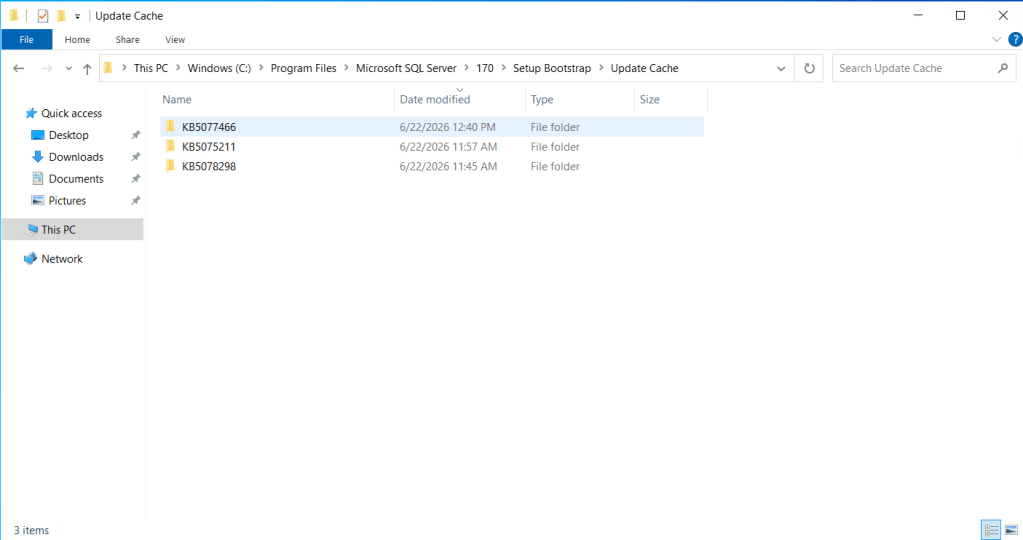
From oldest to newest, KB5078298 is CU1 for SQL Server 2025, KB5075211 is CU2 for SQL Server 2025, and KB5077466 is the GDR for CU2.
Where To Find The Update Cache?
From the screenshot above, you can find the Update Cache folder wherever the Setup Bootstrap folder is for your SQL Server. It’s normally in:
C:\Program Files\Microsoft SQL Server\nnn\Setup Bootstrap\Update Cache
Where nnn = the version number of SQL Server. Here’s a quick reference guide below:
- 170 = SQL Server 2025
- 160 = SQL Server 2022
- 150 = SQL Server 2019
One Important Caveat
Even if you roll back, or uninstall a GDR or CU that you applied to your SQL Server, it will still remain as a folder in the Update Cache. So it is only incrementing new patches you apply, and does not clean up after something is uninstalled.
Why Is This Important?
Having visibility to see what CUs and GDRs have been applied to your SQL Servers is crucial. For example, CU23 for SQL Server 2022 and CU1 SQL Server 2025, both broke Database Mail after their initial release. While Microsoft indicates on both of these releases that later CUs fix this bug whether you first uninstalled the breaking CU or just applied a later one over it, in my case, we were still having Database Mail issues, even after later CUs were applied. I needed to see if we ever applied the original CU23 for SQL Server 2022 or not and this allowed me to prove exactly where we stood.

 DBA Unfiltered
Leave a comment