
Microsoft is always moving towards the latest and greatest features for their products. Faster, more efficient, cool features. There’s usually something that claims to make the grass greener if you go to the cutting edge. However, some things just work. And some things are still useful and applicable to architecture designs even though they may be a legacy approach to what Microsoft recommends.
When working on a major automation CI/CD AzDO pipeline project, we were at an initial fork in the road where we had to make a decision: Go with a classic AzDO pipeline, or go full YAML based. We ended up going with the classic route for the release (CD) portion and YAML based for the build (CI) portion. It made me think from a bigger picture standpoint why going with a classic pipeline, or even hybrid instead of fully YAML is still valid when dealing with SQL Server CI/CD deployments. But before we get into that, let me dive into what YAML even is.
What Is YAML?
Coming from the background as a DBA, I had zero experience with YAML files. I didn’t know what they were, their purpose, or how to really even pronounce it correctly. But, they’re very useful when you want to leverage them for repeatable Infrastructure-as-Code (IaC) style deployments.
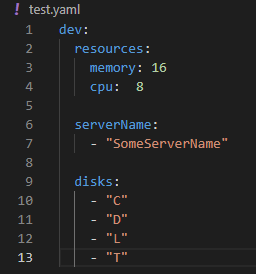
Basically, YAML can be looked at as having a declarative syntax that relies on indentation and key-value relationships. Then, in the context of AzDO pipelines, you’re relying on the pipeline engine to figure out how to execute it. Here’s what an example of a YAML file looks like in my VS Code:
How Pipelines Ingest YAML Files
I’m going to walk you through how a pipeline ingests a YAML file and leverages it for downstream scripts. Here’s a completely generic YAML file example:
version: "1.0"settings: dryRun: false domain: "example.com" profile: defaultenvironments: development: accounts: primary: "example\\service-account-development" secondary: "example\\service-account-development" sources: - "host-a-01" - "host-a-02" targets: - "host-b-01" staging: accounts: primary: "example\\service-account-stage" secondary: "example\\service-account-stage" sources: - "host-c-01" - "host-c-02" targets: - "host-d-01" production: accounts: primary: "example\\service-account-production" secondary: "example\\service-account-production" sources: - "host-e-01" - "host-e-02" - "host-e-03" - "host-e-04" targets: - name: "host-f-01" role: primary - name: "host-f-02" role: secondary grouping: name: "group-prd-01" addresses: - "192.0.2.13" sharedPath: '\\fileserver-01\shared' directoryPath: 'OU=Resources,OU=Infra,DC=example,DC=com' failover: label: "fg-prd-01" endpoint: "endpoint-prd" port: 1433 addresses: - "192.0.2.14"
So, this example YAML file would get evaluated and parsed in the build portion of the pipeline. It would publish the YAML file here as an artifact for the release to then download. During the release, it would scan this published YAML file, and based on a bootstrap PowerShell script that reads the YAML file, determines which environment is running, and sets pipeline variables accordingly.
From there, stages would call their task groups (or individual tasks) and leverage these values to be passed in to their parameters. For example, if I had a PowerShell script that was in a task in Stage2 that say built a cluster for me, since I explicitly set that stage to look for the production values, the bootstrap script would pull all production values and expose them to the task as valid arguments to pass in to its script. So, if the PowerShell script was something like:
Build-Cluster.ps1 -ClusterName ($YAML_CNO) -IP ($YAML_IP) -Servers ($YAML_SERVERS)
Those values are populated by the values parsed from the YAML file via the Bootstrap script. Then the same thing carries on for every task that is like this.
Classic Pipelines Vs YAML Pipelines
So, when building a classic pipeline, you’re going to be functioning within mainly GUI based configuration and administration. For example, when configuring a classic pipeline, you’ll be more in the GUI based task configuration versus code driven templates.
This means you’ll have access to tasks groups which let you bundle individual tasks together for reuse across multiple pipelines, or stages. You’ll have the ability during a release to edit the release, and edit the stage you want, then disable selected tasks you don’t want to run, save it, and just deploy that stage if you want to.
I just mentioned task groups. I like those because it makes administration of code adjustments way easier. For example, let’s say you have a task group that contains an individual task that calls a Windows PowerShell script from a GitHub repo. Let’s say that you want to add another PowerShell task to that task group, but in your release you have many stages that call that task group. Well, you only have to make that change and add the script call in one location and all of your stages in your release that leverage that task group are able to inherit the current list of tasks you want to execute.
With classic pipelines, you get a bit more granularity and control over what runs when, and opportunities for easier administration.
Now, on the flip side, YAML based pipelines are great. They are what Microsoft recommends nowadays when building AzDO pipelines. YAML pipelines have templates for code reuse that serve a similar purpose to task groups, but function differently. So, you’re not going without if you choose to develop a YAML pipeline. With YAML pipelines, you can really get into the whole IaC mindset. This is where your code reusability can shine with these and the MS ecosystem is clearly being pushed in this direction.
Anyways, the main difference between the two is how you are interacting with and implementing your code in your pipeline. Classic gives you more of a GUI based experience with some of its own unique features, and YAML is more code based. Both serve their purpose, which is what I’m going to get into here next.
Why Go Hybrid?
As I mentioned, we decided to go with a hybrid approach for our pipeline. We leveraged a YAML config file for our build (CI) and classic pipeline deployment for our release (CD). What this lets us do, is leverage a core YAML file that the pipeline will ingest and publish as an artifact. This stage validates the YAML file is syntactically correct, and asserts its values to ensure that required fields are present and that values match expected value sets.
Then, from there, our release takes this artifact, downloads it, and uses it throughout the many stages and tasks we have and passes the values in as parameter values where appropriate. That way, the PowerShell scripts that run can leverage the appropriate parameter assignment at runtime based on the environment it’s working in.
Using a classic pipeline approach for this allows us to have a more user friendly approach for the specific tasks we’re doing against our SQL Servers for this particular pipeline. Because this is a classic release, we have the ability for granularity in our stage reruns if something fails should we need it.
To be clear, we’re running two separate pipelines in sequence, a YAML build and a classic release, but the intentional combination of both approaches to serve a single deployment workflow is what I mean by hybrid.
Takeaways
There is validity in using approaches, legacy or not, where they make sense in your design process. If your team lives entirely in code, go YAML end to end. The ecosystem is moving that direction and templates scale well. But if you’re building complex infrastructure pipelines where operational visibility, granularity at the stage level, and task reusability matter, classic or hybrid is a legitimate architectural choice. We went hybrid because it was the right tool for what we were building. Don’t let the legacy label scare you away from something that works.


Leave a Reply