
Patching is such an important part of ensuring your MS SQL Servers are secure, reliable, and resilient. As important as it is, it’s still a tedious process. You have to chronically check for patches (hopefully you don’t have your servers running SQL to auto download and apply patches via Windows Update), look at breaking changes or what the patch fixes, follow links, click buttons, download the CU (GDR security update as well if applicable), remember which download is which, and install them in the right order.
I got tired of doing this for my lab environment, so I made a Python script that automates a lot of that process for me. I know there are probably some cool tools out there that do the same thing, or maybe there are better ways. However, if your shop doesn’t have enterprise patching tools or you just want something you can quickly grab what’s out there, this is a tool that I found beneficial for myself to use and wanted to share it with you.
Why Python And Not PowerShell
I chose to go with Python because it has more robust capabilities for web scraping than PowerShell does. When going out and looking for patches online, combined with the intended logic, it made more sense to go this route. However, combining this with PowerShell to apply the downloaded patches is a good combination. This post just focuses on patch acquisition.
What’s Already Out There
The first tool that’s already out there, and I am a huge proponent of this, is the dbatools.io command Update-DbaInstance. This is a PowerShell cmdlet that comes with the dbatools PowerShell module. It gives you the ability to automate the patching process of your SQL Servers. You can read more as to what it does via the provided links. If you’re not already using it for automated patching, you should be.
However, there is a difference from what this script does versus what dbatools does. I’ll get more into this below, but the main difference is Update-DbaInstance is an end to end workflow tool that will scan, analyze, download the patch for you if needed, and patch your server. It’ll even reboot it for you post patch if you’d like.
This script is more in line with a patch staging script. It grabs the patch for you, and puts it on the location you specify and stops there. That is by design. This gives you the opportunity to review, ensure the patch is good for your environment and do one final check before you apply it.
On top of that, it has an automated N-1 feature. If you tell it to, it’ll automatically see what the most current patch available is, and go one behind that (and include that CU’s GDR as well if available). By design, Update-DbaInstance does not automatically apply or download GDR security updates and focuses on CUs. If you want to apply a GDR security update, you have to explicitly pass the KB number using the -KB parameter. You can view the referenced reported issue on GitHub.
Prerequisites
The only real prerequisite is to have Python downloaded and installed on your system you’re running this script from. You can download Python from the official site here. Make sure when installing Python, that you check “Add python.exe to PATH”. You’ll also need Windows PowerShell to call the script (that’s just how I function when running this on demand) but PowerShell is pre-installed anyways. I like to use Visual Studio Code as my IDE, but to each their own.
Seeing It In Action
So, let’s say that I have a SQL Server 2025 instance and I want to get the most current CU available. This is what I would run to get that:

Here’s the direct code in case that screenshot is too small:
python sql_patch_monitor.py --sql-version 2025 --output-dir C:\Admin\Scripts\SQLPatching
I first made sure to be in the directory context where this Python script is located.
After this ran, this is what I see in my terminal:
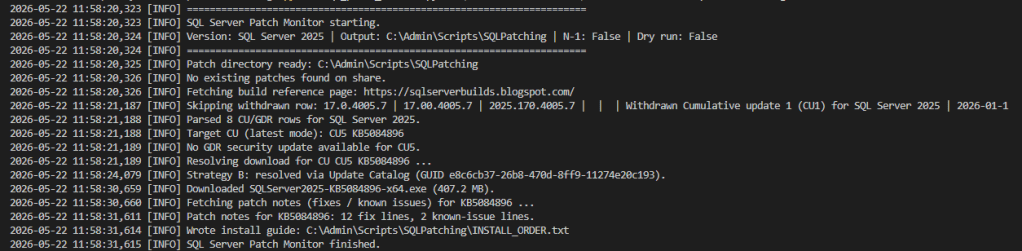
Here’s what it did:
- Go out to https://sqlserverbuilds.blogspot.com.
- Find the SQL Server 2025 related patches.
- Get the most current available patch.
- Check to see locally if that patch is already on the output path location.
- Saw that it wasn’t there, so it proceeded with the download.
- Created a folder with proper naming conventions and put the patch in there.
- Wrote an INSTALL_ORDER.txt file which contains install instructions (breaking changes in this patch, what this patch fixes, and install order instructions if there are multiple patches to apply).
- Wrote a sql2025_patch_monitor file that outputs the logs of what this script did for troubleshooting if needed.
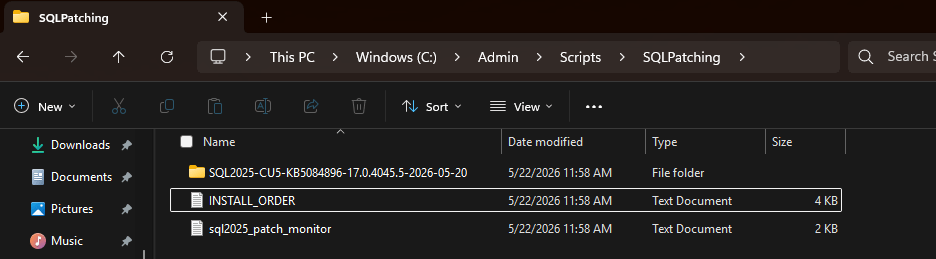
Here’s a screenshot of what this run produced:
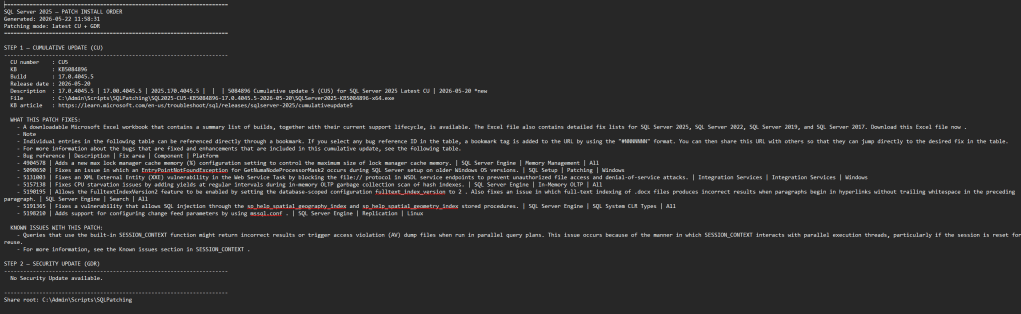
And here’s an example of what the INSTALL_ORDER.txt file has:
What If You Don’t Want The Most Current CU
Some organizations require an N-1 approach to patching. This means that you are (usually) going to be one patch behind most current. This prevents you from installing potentially unknown breaking changes into your SQL Environment. If that’s the case, then just pass in the –n-1 flag.
Let’s say we have a SQL Server 2022 instance where we want to be on N-1 patch level, because at the time of writing this, CU 25 for SQL Server 2022 just came out a few days ago and you need to patch, but you don’t want to be on that new of a release. Here’s what you’d run:

python sql_patch_monitor.py --sql-version 2022 --output-dir C:\Admin\Scripts\SQLPatching --n-1Here’s what the logs look like:
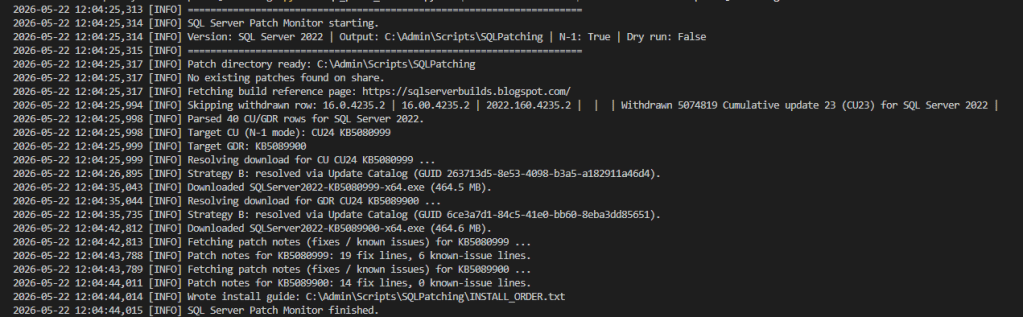
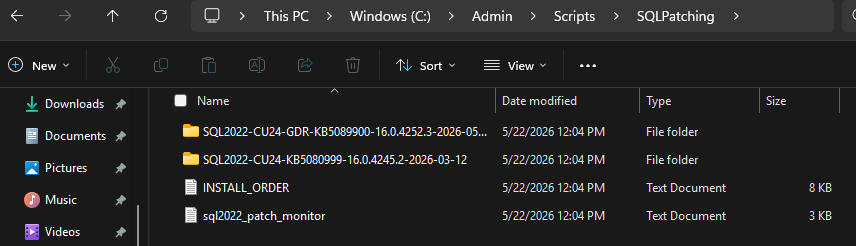
As you can see (hopefully from this screenshot) it recognized it was running in N-1 mode, so it ignored the most recent release (CU 25 in this case) found that there was a CU 24 available + GDR (security update) and proceeded to download both of those and dump them to the specified location:
Here’s what’s cool about the INSTALL_ORDER.txt file:
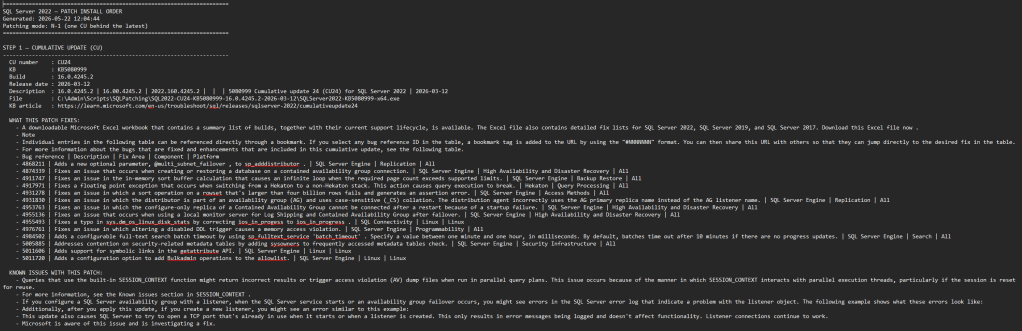
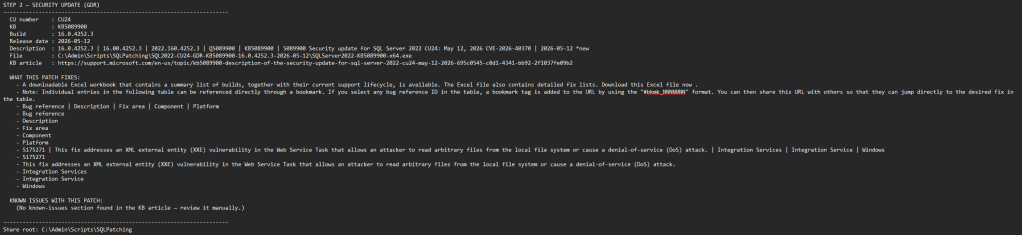
I had to take two screenshots here because it was too big to include in one. However, the file spells out completely what each patch does, and what order to apply them in. Having this N-1 feature is very useful to me because I never have to update anything in the script parameters. If I always want to be one patch behind, that’s what will be downloaded, even when new CUs come out. In this case, when CU 26 comes out, it’ll then download CU 25 automatically.
Keeping Things Idempotent
I try to bake in idempotent functionality into all of my scripts. That way everything is rerunnable. No different here. Before the script tries to download anything, it will first compare what it has on the share versus what it is going to attempt to download. If the patches are already there, it just logs that and exits gracefully. Here’s what the logs look like when I try and re-run the same command before:
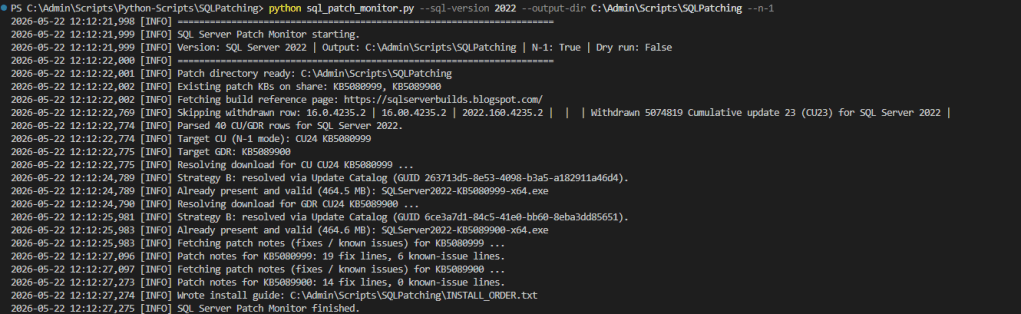
As you can see from the logs, it saw that each patch was already there, didn’t try to re-download anything, and called it a day.
How You Can Take This One Step Further
So, I personally like the fact that I can go grab the most current or prior SQL Server patch whenever I want on demand. However, I don’t want to have to necessarily go pull this script out, run it every time a patch comes out. So, what I’ve done is put this into a simple Windows Task Scheduler job that runs daily at 6AM. It goes out, checks to see if there are any patches available based on the parameters passed in, and if it finds anything, will write it to the location you provide. This way you will always have an opportunity to go to your patching share location and go and grab what you need.
Future Features
I was thinking of maybe adding a feature to the script where it will also accept an optional email parameter. That way if something new is downloaded to your patching share location, it’ll notify you and say “Hey! I’ve downloaded a patch, go check it out.” Might be a good idea, we’ll see. One thing I want to add to the N-1 flag is logic that checks how long the current newest patch has been out. If it’s been out long enough, say 30 days, go ahead and treat it as the stable release and download it automatically. That way you get true set it and forget it patching without ever having to touch the script.
A Tool For Your Toolbox
If you’d like to use this, you can find it in my public GitHub repo here. This tool isn’t meant to attempt to replace any enterprise or fully developed piece of software. There are a lot of great tools out there that can help you automate patching end to end. But, if you need something to supplement your daily administrative tasks, this may be a good tool for your toolbox. Please make sure to read the README.md file at the root of the repo as well as in the script’s folder location as well. Each have important notes and the README.md in the script’s folder location will give you further examples, details, and features the script has.
As always, please test in a non production environment, and never simply copy / paste code you see on the internet before doing your due diligence.


Leave a Reply