
The Old Way Might Not Be The Best Way
So, I have an older blog post that covers how to remove and add a single article from a replication publication. The purpose of that post was to show you how to remove an article, which is pretty straightforward, but more importantly, how to add it (or any article) back to a publication without requiring a snapshot for every object in that publication. Being able to remove an article from a publication, perform some maintenance on it (add a new column, delete a bunch of data, etc…) and then add it back into the flow of a transactional publication and only having to take a snapshot of just that impacted article is a huge win. Some publications are quite large, containing a lot of articles, and some of those articles are heavily transactional with critical applications writing to them. The more surgical you can be with your intraday (and any time of day, really) maintenance with replication the better.
The only annoying part about the scripts I give you in my other post is that there are quit a few T-SQL related steps and code to find and replace, highlight, run, fat-finger, and make your life more complicated.
Finding A Better Solution
I’ve had to perform the removing and adding of single articles from a transactional publication countless times. While the process for me has been consistently successful, there are inefficiencies, as well as times where the publication hasn’t behaved in the way I expected when adding the single article back to replication. I’ve even had experiences where the entire publication re-snapped which defeated the purpose of the surgical approach in the first place.
Any DBA should be familiar with dbatools. This PowerShell toolkit packs tons of useful utility scripts we use on a daily basis into powerful one-liners. And that is just what the following two cmdlets do for us here. They can replace the multi-step scripts that I gave you and condense all of that into two lines.
Remove-DbaReplArticle And Add-DbaReplArticle
Back in 2024 the folks and community that contribute to dbatools started to introduce the frequently requested replication related “suite” of cmdlets. They have introduced quite a few, and I’ve used several of them, all useful. There are two main cmdlets that I want to highlight in this post: Remove-DbaReplArticle and Add-DbaReplArticle.
Feel free to read up more on these. They have more parameters than what I show here in this post that will most likely satisfy what you need to accomplish.
Seeing These In Action
Now, for my simple testing environment, I have two SQL Server 2025 instances on the same computer. Both are patched to the most current CU (CU2 at the time of writing this). The source SQL Server that acts as my publisher and distributor is called WHITE-LIGHTNING and the subscriber server is called WHITE-LIGHTNING\SQL2025. The publication type is a transactional publication called MyTestPublication, and the publisher and subscriber database is called Test. The publication only has two articles in it: dbo.table1 and dbo.table2.
Now, I approached this from the mental standpoint of how most of these types of administrative tasks are initiated. You need to remove a table from replication for some reason be it development work, issues with that table in replication, whatever. Point is, you need to remove it and add it back later on. The first step I did was run the following to remove the article (in this example, table 1) from replication:
Remove-DbaReplArticle -SqlInstance 'WHITE-LIGHTNING' -Database 'Test' -Publication 'MyTestPublication' -Name 'table1'This is a much more efficient approach. The table was then removed from my publication and I ran some inserts to mock an application or process continuing to write to that table on the publication side. I then made some schema changes to table1 by adding another column to it. Once I was ready to add the table back to replication, I ran the following PowerShell line:
Add-DbaReplArticle -SqlInstance 'WHITE-LIGHTNING' -Database 'Test' -Publication 'MyTestPublication' -Name 'table1' After you run this, you can approach it one of two ways. The first, is you can just wait for replication to automatically kick off the snapshot agent, taking a snapshot of just that one article and delivering it to the subscriber. The second is you manually kicking off the snapshot agent for that publication and it’ll snap over just that article. Replication will deliver that snapshot to the subscriber and you’re good to go.
I recommend going with option two. The justification for this is because in my testing, just waiting for replication to do this part on its own introduces too much variability into the process. That’s because sometimes it kicks off the snapshot agent quickly after you run Add-DbaReplArticle and sometimes it takes its sweet time. In my case it took over an hour one time, and a few minutes another time.
Just be aware that if you kick it off yourself, you may see the following at some point in replication monitor in the Snapshot Agent View:
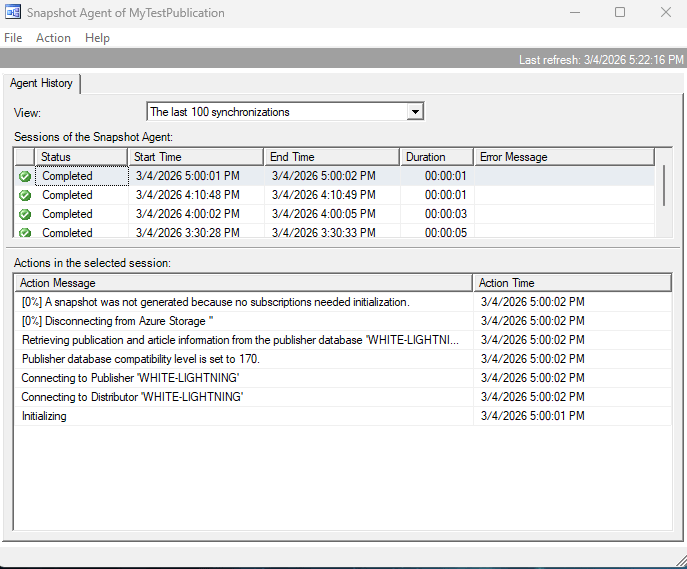
This is ignorable. All this is indicating from your work is that replication got a message that it should look into taking and pushing a new snapshot, but by the time it got to it, it sees that nothing needs to be initialized.
Key Takeaways
It’s pretty cool and convenient to see that the “Add” cmdlet has the ability to do so much under the hood and all you have to do is run that line, kick off the snapshot agent, and you’re on your way.
In the real world, there may be the need to remove and or add multiple tables. These cmdlets that I’ve shown here can still be more than useful in those situations, even though I just was working with a single table here.
As you can see, these two cmdlets are pretty useful. When dealing with replication, there are already a lot of moving parts at play. Having the ability to make your code and processes for these types of tasks be more readable and approachable can help you avoid mistakes, accidents, and save time overall.
 DBA Unfiltered
Leave a comment