
Problem
You want to implement read-only routing for your Always on Availability Group so your reading workloads can be offloaded from your primary replica to one of your secondary replicas. But when it comes time to test, your reading queries aren’t hitting your readable secondary replicas like you expected. What gives? Here are some things to check to ensure that you’re properly configured to take advantage of readable secondary replicas in your AG.
Check #1: Make Sure Your Replica(s) Are Set to Be Readable Secondaries
In the properties of your Availability Group, check to make sure your secondary replicas that you want to function as a readable secondary (really even your primary replica too because after failover, it’ll be a new secondary replica) are set to either “Yes” or “Read-intent only” in the Readable Secondary column on the General tab of your AG properties. You can get to this properties page in the GUI in SSMS by expanding the Always On High Availability folder in the object explorer of your primary replica -> Availability Groups -> Right Click on the AG name -> Properties:

Check #2: Read-Only Routing List Configuration
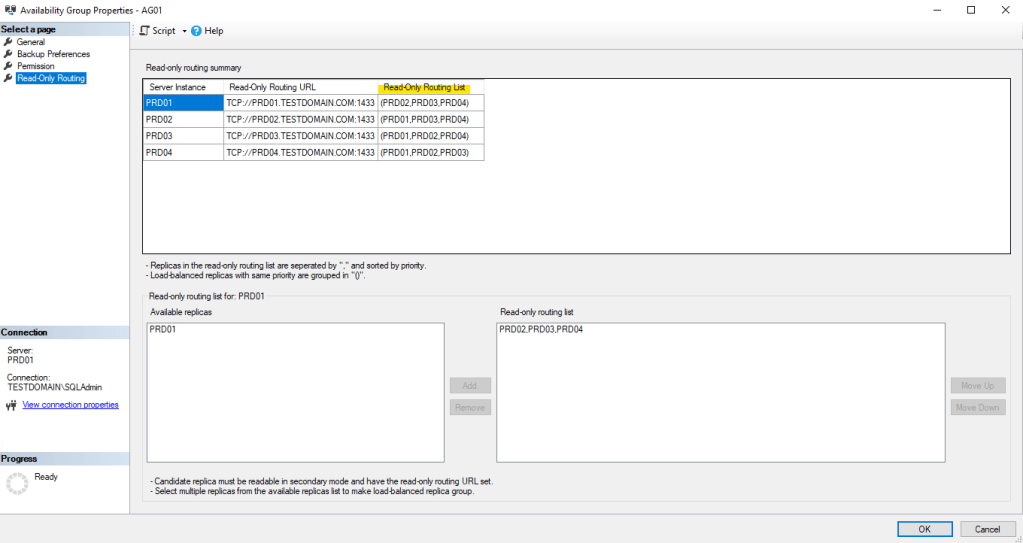
Next, ensure you’ve configured a read only routing list for your replicas that are going to be participating in read-only routing. This tells SQL Server how to handle reading queries as they come in to connect based on which replica is acting as the primary, and tells them which readable secondary replica to connect to (in order of precedence). If you don’t have a Read-Only Routing List configured, then your queries will always be routed to the primary replica, regardless of the Readable Secondary settings. You can check this by going to the Read-Only Routing tab in the properties of your AG. In my test environment, mine looks like this:
Check #3: Read-Only Routing URL Configuration
This is arguably the easiest configuration to get wrong because it’s the easiest to fat finger when you’re configuring read-only routing in my opinion. Having the correct Read-Only Routing URL is essential to ensure SQL Server can actually route connections to the readable secondary. The naming convention makeup of a Read-Only Routing URL is as follows:
TCP://FullyQualifiedDomainName:SQLPortNumberHere is an example of what mine looks like in my testing environment:

Again, this can be found in the same location as the previous check.
Check #4: Application Connection String
In order for your application(s) to be able to take advantage of read-only routing, you have to make sure that their connection string to the database is properly configured. Here are the two key components of a properly configured connection string for an application participating in read-only routing:
- The Availability Group’s Listener Name must be used to connect.
- You cannot specify an explicit server name or IP to connect, you have to use the listener name.
- You must specify the following in the connection string:
ApplicationIntent = ReadOnlyThis indicates to SQL Server “Hey, I only want to read from a database and not write to it.” thus allowing SQL to redirect the query to a readable secondary replica.
Check #5: Synchronized Logins
When you’re using Always On Availability Groups, one of the top administrative tasks is to make sure logins are synced between the primary replica, and the secondary replicas. As a DBA, the first reasoning as to why is in case of a failover, applications can continue to log into the new primary replica and carry out processes and tasks. When you have read-only routing set up, this is another top priority reason to keep your logins synchronized between replicas, because if the login doesn’t exist on the secondary replica it’s trying to read from the connection will fail.
Check #6: Mismatched SIDs
I wanted to break this out from Check #5 because it’s one of those things that tends to trip up DBAs when dealing with AGs and SQL logins. It’s pretty common for applications to use SQL Authentication logins for their regular operations. As we know, SQL logins rely on their SIDs matching between the login and the associated database user in order to access the database correctly.
Too often, I see folks simply script out the login from the primary and create it on the secondary replica(s) without preserving the SID. This leads to a mismatch between the login and the database user, and after a failover, the login can’t access the database. The same issue applies to read-only routing—if the SID doesn’t match on a readable secondary, the login won’t be able to get into the database.
To avoid this, make sure to use tools like the PowerShell cmdlet Copy-DbaLogin or the classic sp_help_revlogin to properly sync logins and preserve SIDs across replicas in your Always On Availability Group.
Final Thoughts
It can be tedious to configure Read-Only Routing for your Always On Availability Group. However, it is a great way, when set up correctly, to take full advantage of your infrastructure and licensing should the business require this as a solution for day-to-day operations.
 DBA Unfiltered
Leave a comment