
Welcome to part 4 of the ChatGPT series: Automation with PowerShell (PS). PowerShell can be a polarizing tool—people tend to either love it or feel overwhelmed by it. I remember feeling quite intimidated when I first started learning it. However, rest assured, you don’t need to be an expert programmer or scripter to begin leveraging PowerShell for your daily tasks.
Off to the Races

As a DBA, you often encounter tasks and processes that can be mundane or tedious. From compiling an inventory of servers to performing side-by-side migrations, PowerShell can be an invaluable tool to enhance your efficiency and simplify your workload. There are several PowerShell modules that integrate seamlessly with SQL Server, but today, I’ll focus on dbatools. This powerful module offers a wide array of cmdlets that streamline both basic and advanced DBA tasks, making your work easier and more efficient. Not to mention it’s free, and open source! Here’s a snippet of categories that they have cmdlets for. Got this from their website:
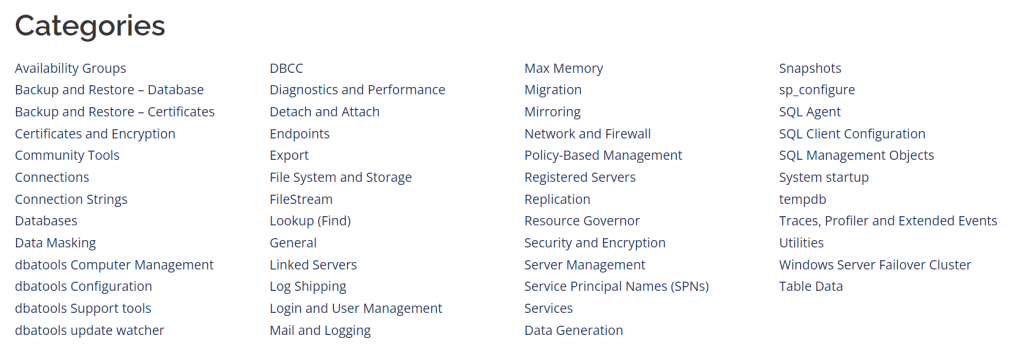
There are tons of cmdlets that dbatools as to offer, and going through each category would defeat the purpose of linking the dbatools website. So, I’ll leave the exploration to you.
Setting up your Environment
Good news, is that PowerShell comes with Windows. So, you don’t have to install it. However, I do prefer using either the ISE tool as a scripting environment, but even more so prefer Visual Studio Code. This is a friendly IDE that you can use to develop and run your PS code in.
Next step is to install the dbatools module. This can be done by running the following in your PowerShell session:
Install-Module dbatoolsThis will download dbatools from the internet and make it available for use in your PowerShell session.
What you can Automate as a DBA with PowerShell
Quite frankly, the easy answer is you can virtually automate everything. But just because you can doesn’t mean you should. Technically speaking, you could use the dbatools cmdlet Start-DbaMigration, pass in a source and destination, put it in a SQL Agent job and automatically migrate a server, but I DO NOT recommend doing that. Just trying to prove a point. In my mind, more applicable use cases of PS and dbatools are things like disk space reports. You can leverage the cmdlet Get-DbaDiskSpace and use that to send out a report on whatever cadence you decide that scans for low disk space on all of your servers. You could also automate syncing logins between nodes in availability groups, or jobs for that matter. Need to monitor your databases on all servers and check to see if they’re in a status other than ONLINE? PS can easily help you accomplish that. There are many other applications such as backups, restores, integrity checks, index maintenance, etc…
Deploying and Configuring SQL Server
Another cool task you can automate using dbatools is deploying and configuring SQL Server instances. I recommend looking into this for non-prod environments. There’s nothing more tedious than installing 40 instances of SQL Server and configuring them all to follow best practices, one-by-one, by hand. Believe me, I’ve done it. Dbatools offers cmdlets that install SQL Server for you, configure it using sp_configure, and even allow you to install community tools like sp_WhoIsActive, Ola Hallengren Maintenance, First Responder Kit, and much more.
My Experience with PowerShell
So, I’ve highlighted some of the useful things you can do with PowerShell and dbatools. However, I’ve really just scratched the surface of what you can accomplish. From my experience with PS, I want to let you know that you do not have to write the cleanest most robust code to start using PS in your day to day tasks. I live off of one-liner scripts that I’ve developed for automating maintenance. Generally speaking though, I’ve used PS and dbatools the most with migrations. This tool simplifies many of the checklist items that need to be done in a migration. These are the main tasks that PS helps me with when doing a migration:
- Migrating databases
- Copying logins
- Copying sp_configure settings
- Copying operators
- Copying alerts
- Copying credentials
- Copying database mail
- Copying proxy accounts
- Copying job categories
- Copying linked servers
- Copying SQL Agent jobs
- Copying SQL Agent schedules
- Copying Extended Event Sessions
- Copying system user objects
I also use dbatools for setting up and cutting over log shipping. Overall, PS has definitely streamlined my workload for critical tasks that would normally be tedious, and time consuming.
Resources for you
I’m going to sound silly saying this, but one of the main resources for me has been Google. There is a lot of documentation out there on PowerShell, and a lot of people who have great solutions that are solved with PowerShell. If you want a more structured path of learning though, I would recommend the Learn dbatools In A Month Of Lunches book by Manning. Other than that, just practice, practice, practice and you’ll become a pro in no time.
 DBA Unfiltered
Leave a comment