
What it is
So, I’m in a phase right now where I am creating stored procedures to make my life easier. There’s nothing more DBA than having canned scripts to get something done. I thought to myself “Why have something boring where you have to highlight one part, execute, highlight another part, execute, etc… I know! I’ll turn this into a procedure…”
I have a lot of work I’m doing for a client right now where I’m migrating about 40 of their SQL Servers to SQL 2019. They have a lot of databases and they are wanting to turn Transparent Data Encryption (TDE) on after the migration. I wanted to find a way to make my life a little bit easier and also maybe spread the workload a bit to their developers without having to shoulder check them. It also can be a good tool to use if someone isn’t innately familiar with TDE (but if you’re not familiar with TDE you shouldn’t be the one turning it on or configuring it). I created a proc called sp_EncryptDatabase. Basically, it leverages the syntax of setting up TDE for both a server and a database and packs it into a cool one-liner execution that saves you time and makes your life easier. Just pass in a few (well documented) parameters, and BOOM! You’re on your way.
Side Note: I know that there is a nifty dbatools module out there that can help you get this done with PowerShell, but for some environments, PowerShell may be locked down, or maybe you’re not as comfortable using PowerShell over T-SQL. Either way, an extra tool in the toolbelt is always a plus.
How it Works (GitHub Link At Bottom Of Post)
There’s a lot of cool (well, at least I think they’re cool) features that this proc has. Running through the parameters, we have:
@DatabaseName – This takes in a desired database that you would like to encrypt.
@ServerCert – Pass in a name of the certificate you would like to create. If nothing is supplied, a certificate name will be generated for you.
@MasterKeyPassword – The master key password will be used to encrypt the server certificate. If one has not been created yet, you need to create one.
@ExpiryDate – An optional date you can pass in as a string to specify when the certificate should expire.
@Progress – This parameter allows you to see several encryption statuses of your databases depending on what you’re doing. You can pass in the following numbers to see different statuses:
0 = No Encryption
1 = Unencrypted
2 = Encryption in Progress
3 = Encrypted
4 = Key Change In Progress
5 = Decryption In Progress
6 = Encryption Key change in Progress
@Report – If you set this parameter to 1, you will get a report of detailed information about server certificates, encrypted databases, unencrypted databases, and other related topics.
@SetupOnly – Sometimes, you may want to just set up the master key and the server certificate and not encrypt any databases just yet. This may be useful to you if you’re staging the servers to enable TDE for databases in an availability group, or you’re unclear as to what databases you need to encrypt. You can set this parameter to 1 and pass in either just a master key password into the @MasterKeyPassword parameter and leave the @ServerCert parameter empty and a certificate will be automatically generated for you, or you could pass in a certificate name to the @ServerCert parameter and specify one yourself.
@Help – This gives you the information about the proc and the parameters described above.
See it in Action
Let’s start off simple here. Say we’re asked to implement TDE for a database from net-new. We can start off by running the following:
EXECUTE sp_EncryptDatabase @Report = 1This is the output I get when I run this on my test server:
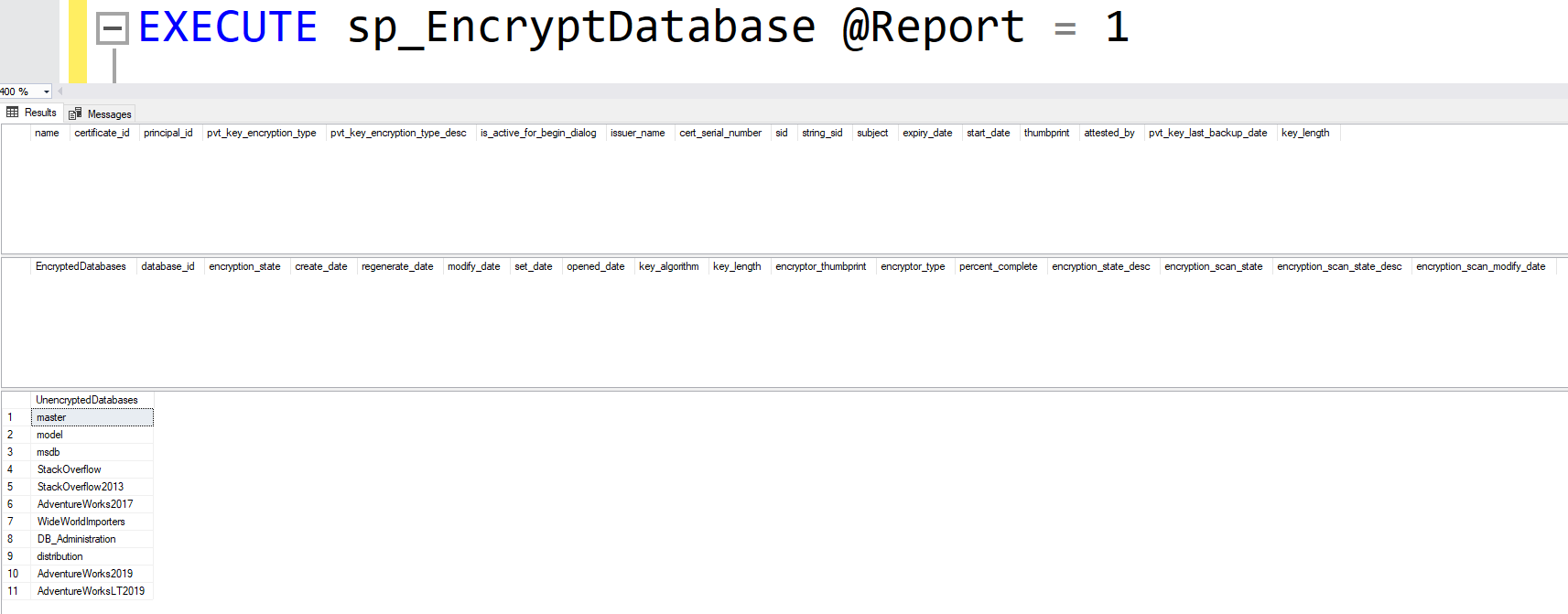
The top result set gives you information about the certificates on the server that are not related to the default ##MS_ related certs. The second result set gives you information on the databases that are encrypted on the server. As you can see, I currently have no user defined certs or encrypted databases yet. The last result set gives you a list of unencrypted databases.
Next, let’s take a look to see how the proc works when you just want to set up a master key and server certificate using @SetupOnly = 1. Again, this may be useful if you’re trying to stage servers and databases that are in an availability group for TDE. I think I’ll let the proc generate a server certificate name for me:
EXECUTE sp_EncryptDatabase @SetupOnly = 1, @MasterKeyPassword = 'StrongPassword1234'If we run a report again, we’ll now see our certificate created:

If you do not supply a server certificate name, the proc will generate one for you using the naming convention ServerName_TDE_CERT. If you had supplied a cert name using the @ServerCert parameter, then that name would be used. You can use this same process to set up more certificates on the same server! Instead of supplying a password for the @MasterKeyPassword parameter, you can leave it blank and just specify the @SetupOnly = 1 parameter and the @ServerCert parameter with the name you want.
Let’s encrypt the WideWorldImporters database. We can do this by simply passing in this database name into the @DatabaseName parameter:
EXECUTE sp_EncryptDatabase @DatabaseName = 'WideWorldImporters'The @DatabaseName parameter is a SYSNAME datatype, so you can either include, or exclude the single quotes. Furthermore, if you are in the habit of including square brackets around object names, this proc takes that into account as well and will format the name for you under the hood.

We can see in the second result set that the WideWorldImporters database is now encrypted. Let’s see about creating another certification on the same server. We can easily do this by running:
EXECUTE sp_EncryptDatabase @SetupOnly = 1, @ServerCert = 'DBA_UNFILTERED_TDE_CERT_2'Notice that we did not have to supply a master key password this time since it’s already created. Running a report once again, we can see the new certificate created:

When there are multiple user defined certificates on a server, I’ve baked into the proc to take that into account. If you only have one cert on a server for TDE, then any subsequent database you enable for TDE will re-use that server cert. However, if you have more than one you have to specify what cert you want to use in your encryption process for that database. Watch what happens if I try to encrypt the AdventureWorks2017 database without passing a server cert since there are multiple now:

After modifying my proc call to include the server cert I want, the database is enabled for TDE successfully. Lastly, the @Progress parameter can be very useful when you are encrypting or decrypting a large database. When you encrypt or decrypt a large database, it takes some time to do depending on resources. The @Progress parameter gives you some insight into that. For example, I’m going to encrypt the StackOverflow database on my server. This is a larger database, so it’ll take some time to encrypt. I’ll run the following code:
EXECUTE sp_EncryptDatabase @DatabaseName = StackOverflow, @ServerCert = DBA_UNFILTERED_TDE_CERT_2When I run a report against the server, I won’t see the StackOverflow database under the list of encrypted databases or the list of unencrypted databases. That is because it is in the process of being encrypted. I can run the following to get some insight as to the status of the StackOverflow database being encrypted:
EXECUTE sp_EncryptDatabase @Progress = 2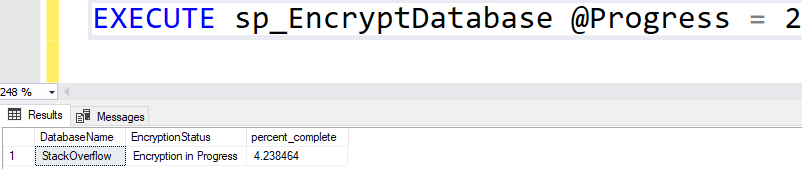
As you can see, the StackOverflow database is being encrypted and is 4.2% complete.
Now you Try
Here’s the code to create the procedure and try it out for yourself. As always, please first test this in a NON PRODUCTION environment. I take no responsibility for the “Oh crap…” moments in your environment.
EDIT / UPDATE TO SCRIPT: I’ve altered the second result set to show the encrypted databases, the encryption type, and the certificate that the database is encrypted by. This can be helpful if you need to rotate TDE certs and validate what database is using what cert.
I’ve also recently added better naming convention automation for named instances by replacing the “\” character with an “_”. This helps when you back the cert up because the “\” character causes issues.
Furthermore, you can now specify an expiry date to indicate when a cert should expire.
If you want to learn how to back up your newly created certificates, check out my other procedure, sp_BackupTDECert here.
GitHub Link: https://github.com/TheUnfilteredDBA/DBA-Procedures/blob/main/sp_EncryptDatabase.sql
 DBA Unfiltered
Leave a comment